Plan your migration from Acronis File Sync & Share

Move users, data, shares, permissions and customer environments into RushFiles while keeping the file-sharing service under your control.

The Workbook covers products in use, customer environments, users, shares, permissions and deployment choice.

What to preserve during the migration

Before moving anything, document the users, data, permissions and customer environments that need to carry over.

Included in the Planning Workbook Use one place to record this information before selecting a pilot customer.
01

Users and roles

List active accounts, administrators and the role each person needs.

02

Shares and permissions

Record who can access each share and the level of access they need.

03

Folder structure and data

Map the existing folder structure, data volume and anything that should not be moved.

04

Customer environments

Keep each customer’s users, data, policies and migration contact together.

Turn the inventory into a migration plan

Use the information you collected to decide what moves, how it is organised and which customer should migrate first.

STEP 01

Document the current setup

Confirm users, roles, shares, permissions, folder structure and customer ownership.

STEP 02

Define the RushFiles structure

Map users to roles, folders to shares and each customer to a separate company.

STEP 03

Migrate a pilot customer

Import users, upload data, test access and resolve issues before moving the next customer.

Download the Planning Workbook

Continue delivering file sharing as your own service

You keep the customer, the packaging and the pricing. RushFiles supplies the platform behind it.

Operational control

  • Manage multiple customer environments from one place.
  • Keep each customer's users and data separated.
  • Control users, access and policies across the environments you run.
  • Administer the file-sharing service centrally instead of signing into each customer separately.

Commercial control

  • Retain the end-customer relationship.
  • Define the service package you offer.
  • Set your own customer pricing.
  • Include file sharing in your wider managed-service offering.

How RushFiles works for users and service providers

Two different experiences sit on the same platform. Your customers' staff work with files. You work with environments.
For end users

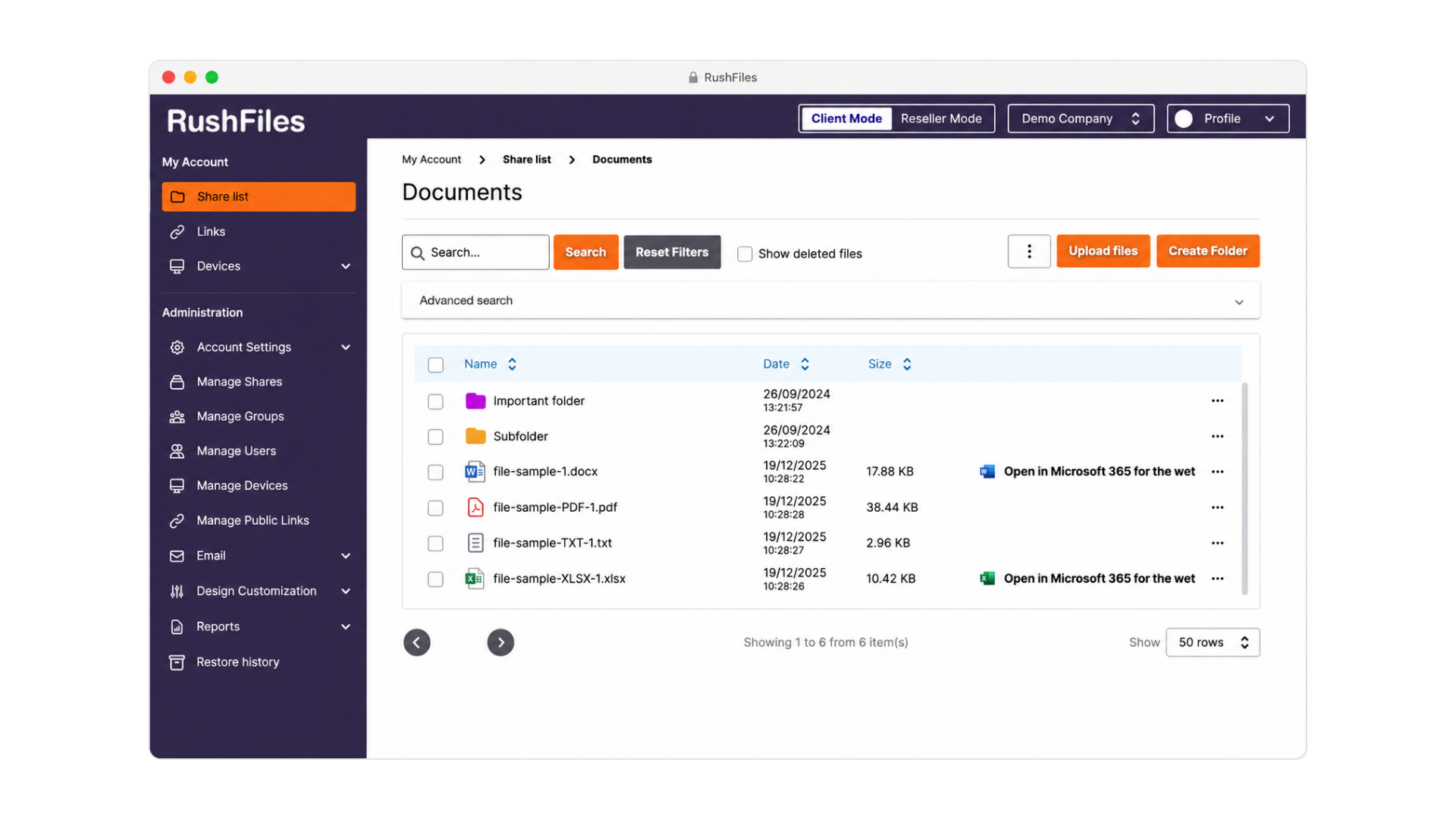
RushFiles web client showing a share called My First Share with folders listed by name, date and size, and actions for upload, create folder and deleted files.
Web client, inside a share
  • Access files through the supported web, desktop and mobile experiences.
  • Work with shared folders in a familiar folder structure.
  • Share with internal and external users.
  • Access file activity and version history.

For the service provider

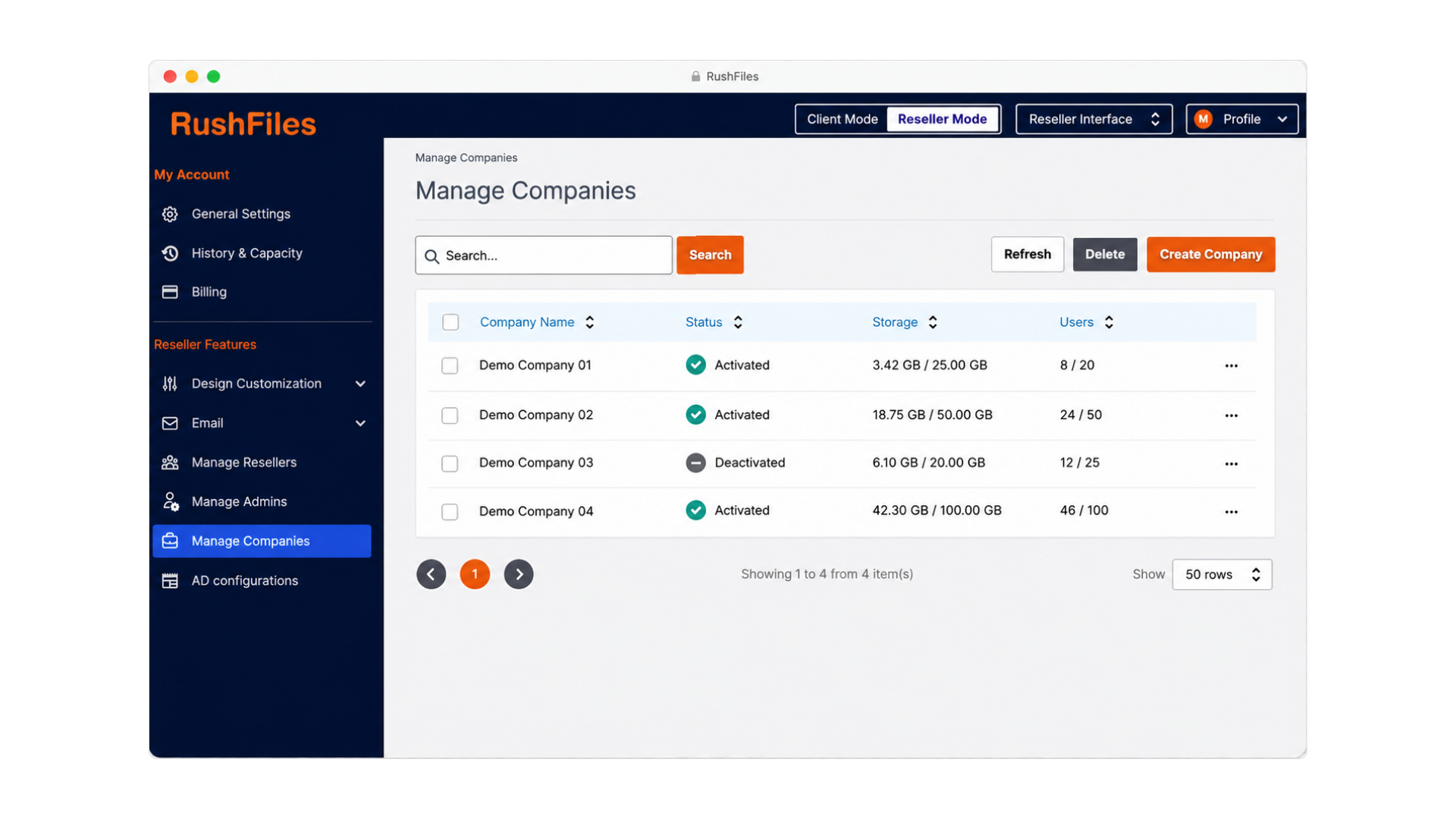
RushFiles company administration screen listing users with name, email and user type, plus controls to refresh the list and create a new user.
Reseller mode, company management
  • Create a separate company for each customer.
  • Manage users, shares and permissions within each company.
  • Keep each customer’s data, access and policies separate.
  • Add and manage customer companies from one administration interface.

Watch the product walkthrough

Choose between SaaS and On-Premise

Both options run the same platform. The difference is who operates the infrastructure.

RushFiles SaaS

RushFiles operates and maintains the complete platform and infrastructure for you.

Who operates the infrastructure
RushFiles.
Where data is hosted
In the RushFiles SaaS environment.
Maintenance responsibility
RushFiles maintains the platform, servers, storage and underlying infrastructure.
Branding
Apply your branding to the web app, customer emails and service domain.
When it fits
You want to launch and manage the service without operating infrastructure.

On-Premise

Run RushFiles on infrastructure operated by you or your customer, with greater control over hosting and branding.

Who operates the infrastructure
You or your customer.
Where data is hosted
On infrastructure controlled by you or your customer.
Maintenance responsibility
RushFiles maintains and updates the RushFiles platform. You or your customer maintains the servers, storage and underlying infrastructure.
Branding
Full white-labelling across the web app, service domain, customer emails, desktop applications and mobile applications.
When it fits
You need control over data location and infrastructure, or want to deliver a fully white-labelled service.

Create your Acronis file-sharing migration plan

The Acronis File Sharing Replacement Planning Workbook for MSPs is a working document. It gives you a structure to fill in with your own numbers.

  • Products and environments currently in use
  • Users and customers per environment
  • Storage locations and volumes
  • Shares and permissions to preserve
  • Deployment requirements
  • Pilot scope and success criteria
  • Migration sequence across customers
  • Risks, owners and next actions

Send me the Workbook

What our partners say:

image of website on a laptop (for a web design agency)
Iron Tree

RushFiles empowers businesses to securely manage their data, whether migrating from physical on-premise servers or seeking an alternative to consumer-grade cloud storage.

The ease of management and overall support from RushFiles has been great - we have never once felt like a customer of theirs, it extends further than this.

image of brainstorming session for a productivity tools business
Jason Frisch
CEO, TSUKAERU

RushFiles Virtual drive technology allows me to limit the use of my local (an expensive) SSD. Having the ability to share files in multiple locations is perfect when dealing with multiple entities located in different countries. The transfer speed is perfect locally, while still allowing access from anywhere in the world.

RushFiles will not only bring a new revenue stream to your business but will also help drive high-profit margins that are not available with a lot of more famous brands, that offer inferior services. The ability to easily onboard partners has been key to our success!

image of classroom lecture on ai
David Thor Krist Jansson
MD SALES, ENDOR

RushFiles had technical advantages than the other solutions that we compared it with. The ease of use, multi-tenancy, and the price was especially acceptable.

Our customers now use their file shares in an easy way, in any location on any device.

image of company milestones in a timeline format (for an edtech)
Stock Distribuidora

Rushfiles is the correct product to add to our company and share with our MSPs. It is simple and robust, making it easy for our team to sell, use, and support. With strong security and encryption, Rushfiles aligns with our market needs, providing a better cost and secure option compared to other solutions.

Request a migration-planning call

Tell us about your current setup and what you need to plan. A RushFiles team member will contact you to arrange a migration-planning call.

The call can cover

  • Which Acronis file-sharing products are involved
  • The number and type of customer environments
  • Users, data volumes, shares and permissions
  • SaaS and On-Premise considerations
  • Pilot scope and what would count as a successful pilot
  • No commitment required. Discuss your technical questions and migration needs before deciding on the next step.
Thank you. We have received your request. A RushFiles team member will contact you to arrange the migration-planning call.
Something went wrong. Please check the form and try again.

Frequently asked questions

It applies to Acronis file-sharing products and services, including Acronis Cyber Files, Acronis Files Connect and Acronis Cyber Files Cloud Sync & Share. If you run more than one, or you are not certain which product and version you have, select that option in the Workbook form and we will work from what you can confirm.

No. RushFiles is a file sharing and cloud storage platform. It does not replace backup, endpoint or security products. You can move the file-sharing part of your service to RushFiles and leave the rest of your stack in place.

Yes. Users can be imported in bulk from a CSV file into a specific company. The import creates each user with an Admin, Internal or External role, defines whether that user can create shares, and can create private shares at the same time. Deciding which role each account should get is part of the Design phase.

Yes. The bulk upload tool works from a share-based folder structure, matches folders to shares, creates shares that do not exist yet and keeps the folder structure intact. You can also control overwrite behaviour for remote, local or newer files.

Each customer is a separate company with its own users, files, storage, permissions and policies. You manage them from the reseller panel, and users are imported into the company they belong to.

Yes, and it is the recommended approach. Choose one customer that represents your wider base, migrate it, check users, shares, permissions and end-user access, then use what you learn to set the sequence for the rest.

Yes. With SaaS, RushFiles operates the platform and you do not run servers for it. With On-Premise, you or your customer operate the infrastructure and control where data is stored.

A rough count of customer environments, users and stored data, the Acronis file-sharing products in use, any data location requirements, and one customer you would consider for a pilot. The Planning Workbook is structured around these points, so filling it in first makes the call more useful.

No. The Workbook is a planning document sent by email. It does not create an account or start a trial. A free trial is available separately from the main navigation.

No. RushFiles is an independent platform and is not affiliated with or endorsed by Acronis. Acronis is a registered trademark of Acronis International GmbH.

Ready to review your migration approach?

You have seen the multi-customer model, the migration tools and the five phases. The next step is a conversation about your specific environments.