
FTP Replacement for Service Providers
Alternative to FTP for Service Providers | Looking for a secure alternative to FTP? This guide explains FTP replacement options for MSPs, including SFTP vs EFSS, multi-tenant file sharing, and deployment models.
FTP Replacement for Service Providers
Moving from FTP and SFTP to Enterprise File Sync and Share (EFSS)
FTP (File Transfer Protocol) is still present in many service provider environments. MSPs often operate FTP, FTPS, or SFTP servers to exchange files with clients, automate data transfers, or provide upload locations.
FTP transfers files between systems. It does not manage access, customer separation, or audit requirements at the platform level.
When FTP servers are used to serve multiple customers, access control and isolation are handled through folders, user accounts, and manual configuration. As the number of clients increases, this model becomes harder to administer consistently.
At this stage, service providers typically begin evaluating alternatives to FTP.
FTP, FTPS, and SFTP: What They Actually Provide
Traditional FTP provides file transfer without encryption.
FTPS and SFTP add encryption in transit. They improve transport security but do not change the architecture. They remain file transfer mechanisms.
What they do not provide:
- Centralized multi-customer administration
- Structured audit reporting
- File version history
- Granular role-based access control
- Logical tenant separation
- Built-in ransomware recovery
For single-purpose transfers between known systems, SFTP may be sufficient. For service delivery across multiple clients, limitations appear.
What Is a Secure Alternative to FTP?
A secure alternative to FTP is typically an Enterprise File Sync and Share (EFSS) platform that replaces standalone FTP servers with structured file access, logging, and tenant separation.
Instead of using FTP or SFTP for file exchange, service providers deploy an EFSS platform to:
- Control user-level permissions
- Separate customers logically
- Track file activity
- Provide web-based access
- Support both cloud and self-hosted deployments
In this context, FTP replacement does not simply mean changing the protocol. It means replacing the file transfer model with a file management platform.
Why Service Providers Replace FTP Servers
FTP replacement is rarely about speed. It is usually about control and accountability.
Common triggers include:
- Audit requirements that demand detailed access logs
- Clients requiring browser-based file access
- Manual user provisioning becoming inefficient
- Difficulty isolating customers on a shared FTP server
- The need to offer file sharing under the provider’s own brand
- Increased ransomware risk
In these situations, FTP is no longer a simple utility. It becomes part of the service delivery layer, without being built for that role.
FTP vs Enterprise File Sync and Share (EFSS)
Enterprise File Sync and Share (EFSS) platforms extend beyond file transfer. They manage file access, synchronization, sharing, and logging within a defined structure.
The distinction is functional:
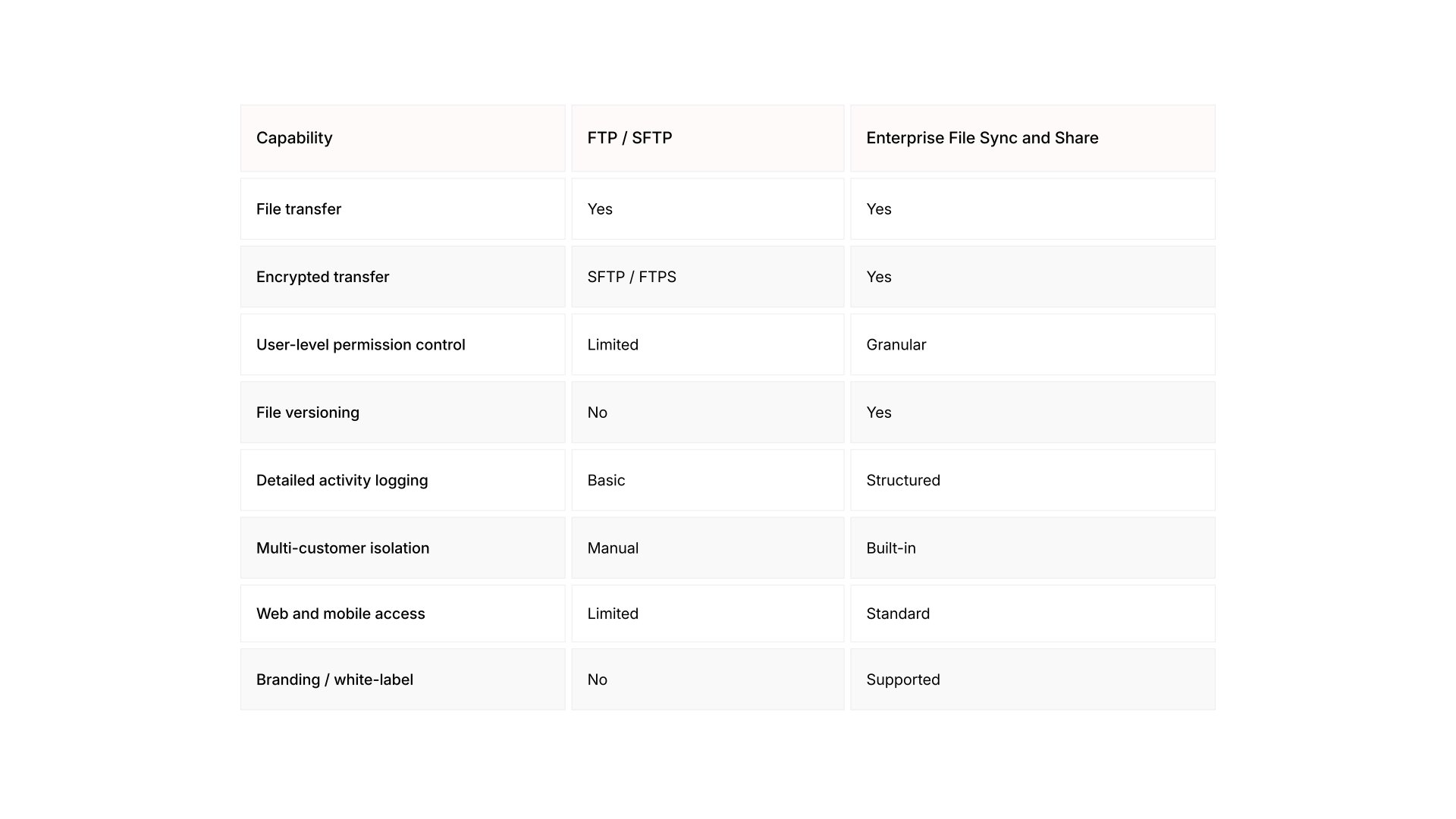
FTP moves files.
EFSS platforms manage how files are accessed, shared, and audited. For MSPs, that difference affects administration time, compliance posture, and service positioning.
Multi-Customer File Sharing and Tenant Separation
When a single FTP server supports multiple customers, isolation is typically achieved through separate folders or accounts. In some cases, providers deploy separate FTP instances per client.
This increases infrastructure overhead and administrative complexity. Multi-tenant file sharing platforms are built to isolate customers logically within one system.
Each customer can have:
- Separate user groups
- Dedicated storage areas
- Independent policies
- Individual audit trails
This reduces manual configuration and makes separation enforceable at the platform level.
Learn more about multi-tenant file sharing for service providers.
Compliance, Logging, and Data Governance
Regulated environments require traceability.
Auditors frequently ask:
- Who accessed a file?
- When was it accessed?
- Was it modified or downloaded?
- Can previous versions be restored?
- Where is the data stored?
FTP servers can log connection attempts. They do not typically provide structured file-level audit reporting across customers.
Enterprise file sharing platforms include centralized activity logs and retention controls. This simplifies reporting for GDPR, industry regulations, and internal governance requirements.
From FTP Drop Zones to Client Portals
Many service providers replace FTP drop zones with authenticated client portals.
Unlike FTP access, a client portal allows:
- Controlled user authentication
- Time-limited sharing links
- Permission-based download access
- Activity tracking
- Delivery under the provider’s brand
This shifts file exchange from a background utility to a defined service offering.
Learn more about client portals for file sharing.
Deployment Options: Self Hosted and Cloud-Based Alternatives to FTP
FTP replacement does not require moving to a single deployment model.
Service providers typically evaluate:
- Self hosted file sharing (on-premise EFSS)
- Private cloud deployments
- SaaS-based enterprise file sharing
The decision depends on data sovereignty requirements, customer profile, and infrastructure strategy.
Learn more about on-premise file sharing deployments.
Learn more about SaaS-based file sharing for managed services.
When FTP Still Makes Sense
FTP and SFTP remain useful for automated system-to-system transfers where no end-user access or governance layer is required.
If the requirement is limited to backend automation between known endpoints, FTP may remain appropriate.
When file sharing becomes customer-facing, auditable, branded, or multi-tenant, service providers often move toward enterprise file sync and share platforms.
Where RushFiles Fits
RushFiles is an Enterprise File Sync and Share platform built for service providers. It allows MSPs and CSPs to replace FTP servers with a structured file sharing service that supports multi-customer administration, detailed activity logging, and flexible deployment through SaaS or on-premise models.
Instead of maintaining FTP as infrastructure, service providers can deliver file sharing as a defined service with controlled access and enforceable separation.