
FileCloud Alternative: RushFiles vs FileCloud
Cloud Alternative: RushFiles vs FileCloud Comparison | Compare RushFiles and FileCloud enterprise file sharing platforms. See differences in deployment, administrative controls, and service provider delivery models.
FileCloud Alternative: RushFiles vs FileCloud
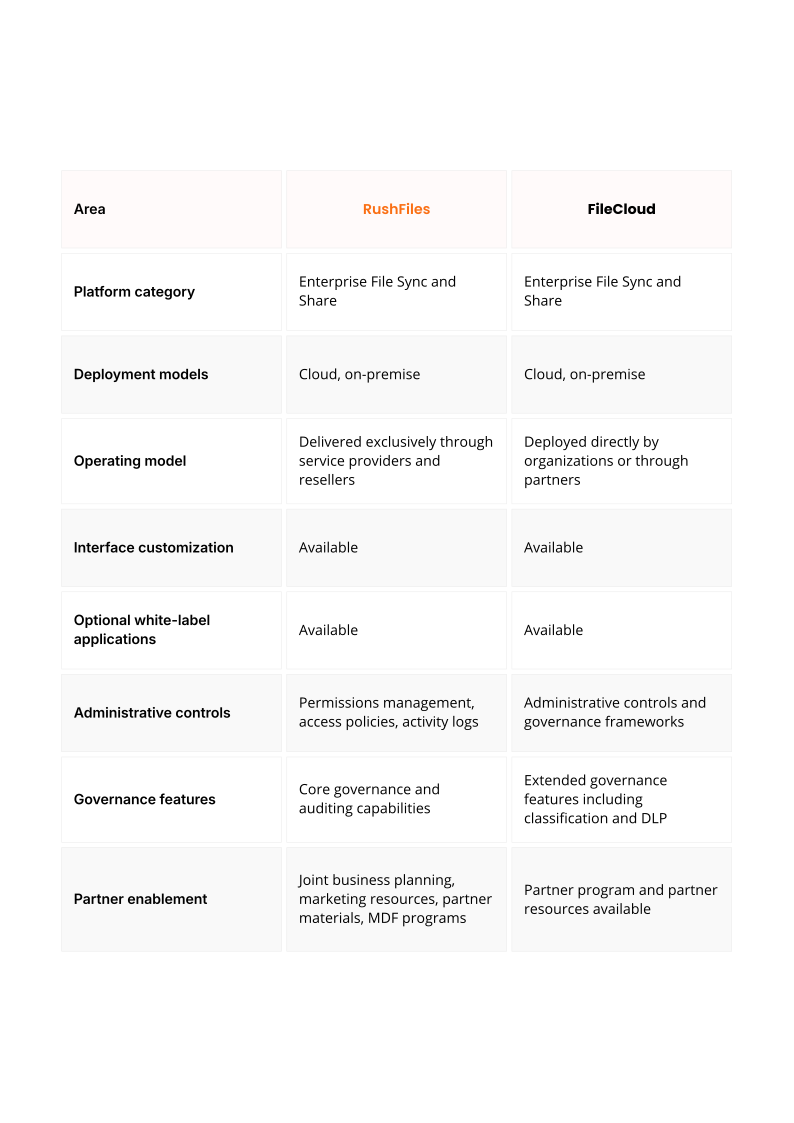
RushFiles and FileCloud are both enterprise file sharing platforms used to replace traditional file servers and provide secure file access for organizations.
Both platforms support file synchronization, file sharing, and administrative control over users and data. Differences usually appear in how the platforms are deployed, how governance features are implemented, and how the platforms are delivered and operated.
This article compares RushFiles and FileCloud across deployment approach, file collaboration, security controls, and partner delivery models.
Flexible deployment
RushFiles can be deployed in the cloud or on-premise, allowing organizations or service providers to operate the platform within their own infrastructure or hosted environments.
FileCloud also supports cloud and on-premise deployments, with organizations often operating the platform directly within their own infrastructure.
Deployment decisions typically depend on infrastructure requirements, regulatory policies, and operational preferences.
Secure file sharing and collaboration
Both platforms allow users to synchronize files and share them across web, desktop, and mobile clients.
RushFiles provides file sharing controls such as permissions, password protection, expiration settings, download restrictions, and file versioning. These controls allow administrators and users to manage how files are shared and accessed.
FileCloud provides comparable file sharing functionality and includes additional governance tools often used in environments with extended compliance requirements.
Customizable service delivery
RushFiles is delivered exclusively through service providers and resellers. Partners operate the platform for their customers and manage subscriptions, infrastructure, and customer relationships. Partners can customize the interface and optionally deploy white-label applications and branded environments as part of their own service offerings.
FileCloud can be deployed directly by organizations or delivered through partner programs depending on the chosen deployment model.
File access and collaboration
Both platforms allow users to access files through web interfaces, desktop clients, and mobile applications. Files can be synchronized across devices and shared with internal or external users.
RushFiles provides a collaboration workflow where users can share files or folders, assign permissions, and control access through expiration settings, passwords, and download restrictions. Versioning allows previous file versions to be restored if files are modified or deleted.
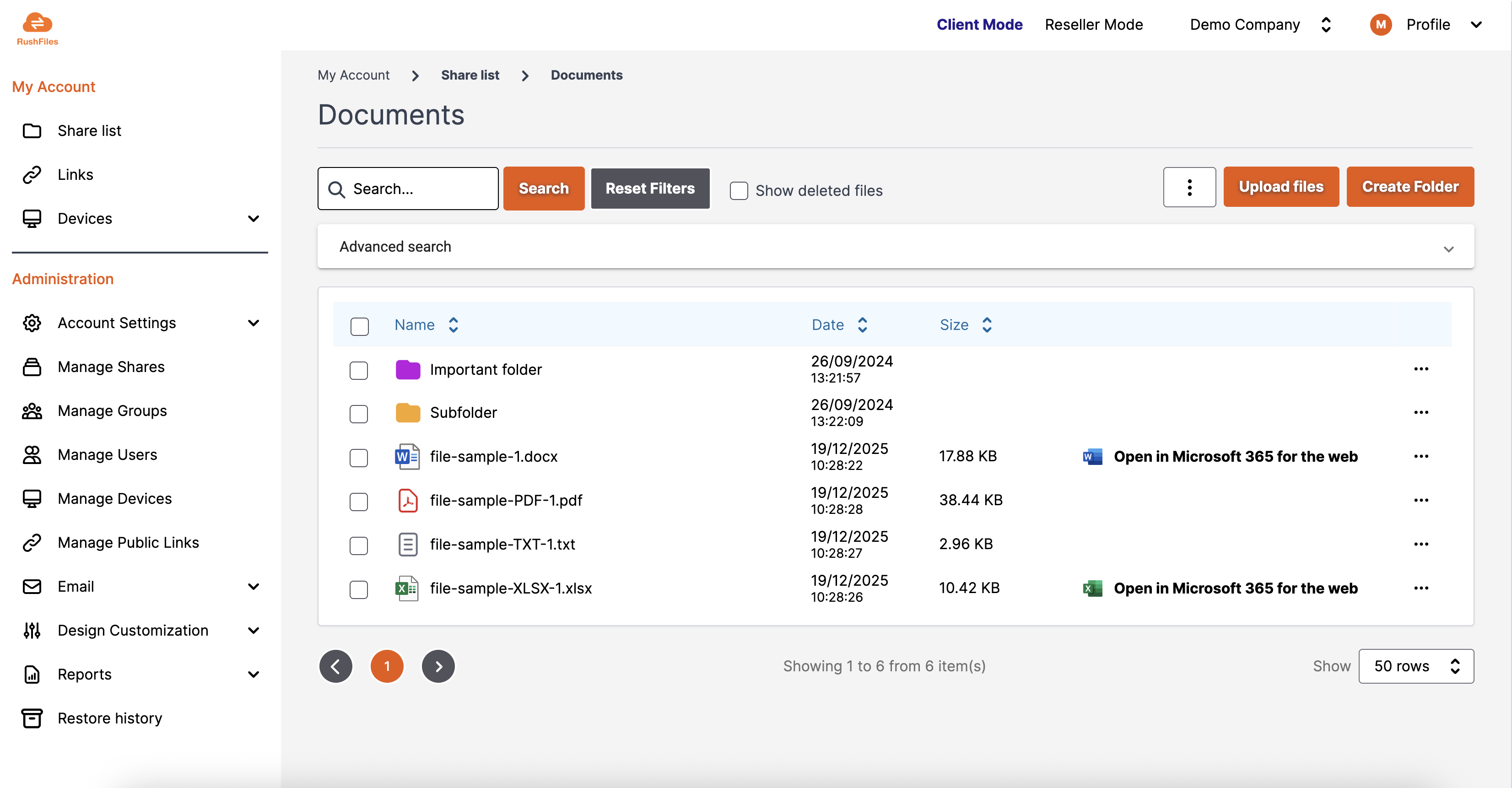
This interface allows administrators and users to manage file access, permissions, and collaboration from a single environment.
FileCloud provides comparable file access and synchronization capabilities and includes additional administrative controls related to governance and content management.
Security and auditing
Security controls are a core requirement for enterprise file sharing platforms. Both RushFiles and FileCloud provide encryption for data in transit and at rest, role-based access control, and activity logging.
RushFiles provides administrative visibility into user activity, file access, and sharing actions, allowing administrators to monitor how files are used within the platform.
FileCloud provides similar auditing capabilities and also includes additional governance tools such as classification and data loss prevention controls.
RushFiles vs FileCloud: platform comparison
When organizations choose RushFiles
RushFiles is commonly used by service providers delivering file sharing as part of their managed services, as well as organizations that prefer a service-provider-operated platform. The reseller model allows partners to operate the platform for customers and integrate it into broader service offerings.
When organizations choose FileCloud
FileCloud is often implemented directly by organizations that want to operate an enterprise file sharing platform within their own infrastructure and require extended governance capabilities.
Summary
RushFiles and FileCloud both belong to the enterprise file sync and share (EFSS) category and provide secure file access, collaboration, and administrative control.
The main differences typically relate to deployment approach, governance capabilities, and how the platform is delivered and operated.
Organizations evaluating a FileCloud alternative often compare these aspects alongside operational requirements and infrastructure preferences.
About this comparison
This comparison is based on publicly available documentation and vendor materials as of 6March 2026.
Product capabilities and deployment models may change over time.
If any information is inaccurate, please contact marketing@rushfiles.com.